
Action! Update history
Follow the process of development of your favourite screen recorder.
We care about our customers. To keep up with fast-changing market of computer hardware Action! needs to be constantly upgraded. To make a life of our users simpler we develop and add new features.
See the history of Action! and check where the recording have started.
Action! 4.48.1 is now available!
What's new in Action! 4.48.1?
- Fixed Twitch account login in Account Manager
Action! 4.48.0 is now available!
What's new in Action! 4.48.0?
- Added support for Elgato 4K X, 4K S, HD60 X, Neo and Cam Link devices
- Fixed video aspect ratio issues when recording multiple monitors in a single video
- Fixed issues with capturing duplicated displays
- Improved HDR to SDR tone mapping
- Added SmartSeek in built-in video player (video preview when seeking)
Action! 4.47.1 is now available!
What's new in Action! 4.47.1?
- Fixed AVI to MP4 export
- Fixed Riot Games with Vanguard anti-cheat enabled (please use Screen Mode or Window Mode for League of Legends, Valorant and 2XKO game recording/streaming)
Action! 4.47.0 with support for latest Nvidia R590 drivers is now available!
What's new in Action! 4.47.0?
- Added support for Nvidia R590 (591.44 and newer) drivers
- Added split NVENC encoding support which allows faster video encoding using multiple NVENC hardware cores (on selected Nvidia RTX 4000/5000 GPU)
Action! 4.46.0 with fixes for latest Nvidia 580.xx drivers is now available!
What's new in Action! 4.46.0?
- Fixed lack of NVENC hardware acceleration on Nvidia RTX 5000 GPU family with 580.xx or newer drivers installed
- Temporary fix/workaround for DirectX 12 capturing in Game Mode on Nvidia GTX and RTX GPUs with 580.xx or newer drivers installed
- Fixed video preview in HDR mode
Action! 4.45.0 with real time video zoom is now available!
What's new in Action! 4.45.0?
- Final fixes and improvements for Windows 11 24H2 update (new update is now working just like on 23H2)
- Added real time video zoom that is following mouse cursor position. You can set the zoom amount in Settings-Video using "max. Zoom list". The default hotkey for turning zoom on/off is CTRL+PGUP and can be customized in hotkeys tab. When zoom is activated you will see a yellow frame around your screen.
- Improved performance for Windows 11 24H2 update
- Added "Entire desktop capture" to Active Screen list. This allows easy capture of all monitors in a single video using "Screen" mode.
- Important fixes for VRR capture mode (Variable Refresh Rate)
- Zero lag real time preview
- Added red frame around Action! main window when recording/streaming is in progress (Windows 11)
Action! 4.44.1 is now available!
What's new in Action! 4.44.1?
- FIXED support for Nvidia RTX 5070/5080/5090 GPUs (444 recording is not working as CUDA is not working properly for this GPU, fix in drivers is needed)
- FIXED support for Windows Server 2025
- FIXED automatic HDR detection for Windows 11 24H2 update
Action! 4.44.0 is now available!
What's new in Action! 4.44.0?
- Added new capture mode (Variable Refresh Rate) which allows intelligent video capture synchronized with display's v-sync, minimizing recorded file size and lowering power consumption and CPU/GPU use (please note that in this mode the video framerate is the maximum framerate at which the video will be captured - from 1fps to the value selected)
- Fixed 4:4:4 DirectX 9 (and older DirectX) recording (please note that DirectX 9 is recorded in 4:2:2 format and stored in 4:4:4)
- Fixed problems with region recording/streaming in multi-display setups
- Movement of selected region is now possible during recording/streaming
- Added "Show welcome screen" option that allows omitting Action! welcome screen (Settings->General last option on the list)
- Added support for video capture from any video streaming service using Google Chrome browser (enter Action! Game Mode and start video using Chrome browser)
- Stability improvements
Action! 4.43.1 with further improvements for Windows 11 24H2 update is now available!
What's new in Action! 4.43.1?
- Further improvements for Windows 24H2 update
- Fixed Photoshop recording problem when very large brush size is selected
- Improved support for recording audio from selected game/application when spatial audio is enabled (like Windows Sonic for Headphones)
Action! 4.43.0 with critical fixes for Windows 11 24H2 update is now available!
What's new in Action! 4.43.0?
- Fixed HUD in desktop mode (fix for Windows 11 24H2 update)
- Fixed automatic HDR detection for games (fix for Windows 11 24H2 update)
- Fixed audio recording from selected application (fix for Windows 11 24H2 update)
- Fixed drawing panel (fix for Windows 11 24H2 update)
- Improved HUD refresh in desktop mode
- Fixed capturing Windows Store games (in Game Mode) when WindowsApps folder is root (C:\) folder
Action! 4.42.0 with fixed Facebook LIVE streaming support is now available!
What's new in Action! 4.42.0?
- Fixed Facebook LIVE streaming support in custom mode (using URL and Streamkey)
- Fixed Facebook LIVE streaming using Account Manager (direct streaming to Facebook wall)
- Improved preview performance for Intel GPUs
- Improved support for Windows Store games and applications (UWP)
Action! 4.41.1 is now available!
What's new in Action! 4.41.1?
- Stability and performance improvements in Window/Selected Application recording mode
- Performance improvements when running Action! in non-administrator mode
- Changes in multiple screenshot capture (time interval)
Action! 4.41.0 with Time-Shift for Window and Device mode is now available!
What's new in Action! 4.41.0?
- Added Time-Shift (loop buffer) support for selected window mode
- Addec Time-Shift (loop buffer) support for device capture mode
- Added support for middle mouse button as hotkey
- Added screenshot shutter sound option
- Added automatic screenshots sequence with time interval
- Fixed problems in Window recording mode (window picker)
Action! 4.40.0 with pixel perfect HEVC 4:4:4 recording is now available!
What's new in Action! 4.40.0?
- Added pixel perfect recording in HEVC 4:4:4 video format (for latest Intel and Nvidia GPUs)
- Fixed GPU memory leaks
- Added camera shutter sound after screenshot capture
- Changed recording date formatting (sort friendly)
- Window picker improvements
- Improvements for HDR capture devices (tone-mapping detection etc.)
- Performance and stability improvements
Action! 4.39.1 is now available!
What's new in Action! 4.39.1?
- Fixed Action! not connecting to games installed in specific folders
- Fixed Action! not working with DXVK in Direct3D 9 mode
- Stability fixes
Action! 4.39.0 is now available!
What's new in Action! 4.39.0?
- Major improvements for HDR capturing devices (Avermedia, Elgato/Corsair)
- Added automatic HDR signal detection and tone mapping for Avermedia and Elgato devices
- Fixed auto HDR detection for Steam games in Screen and Game capture modes
- Added color format selection for webcams and capturing devices (RGB, YUY2, NV12, P010 etc.)
- Added HUD in Device Capture mode
- Added browser overlay scaling (50-300% useful for displaying live chat on HUD in 4K)
- New advanced HDR to SDR tone mapper
- New improved SDR/RGB to HDR conversion for graphics/web browser/camera overlays in HDR mode
Action! 4.38.2 is now available!
What's new in Action! 4.38.2?
- Fixed long Action! startup time
Action! 4.38.1 is now available!
What's new in Action! 4.38.1?
- - HOTFIX for bug in newest Nvidia GPU drivers (fixes problems with 1440p video encoding)
- - Added support for Action! RCU 2.0. Digitally signed beta APK for android can be downloaded here: https://downloads.mirillis.com/files/actionrcu2-release-beta.apk
Action! 4.38.0 is now available!
What's new in Action! 4.38.0?
- Added aspect ratio locking for selected desktop region
- Added "play captured sound" option for primary audio devices in Device Mode (useful for capturing devices/cards)
- Fixed built-in video player not working on old GPUs
Action! 4.37.1 is now available!
What's new in Action! 4.37.1?
- HOTFIX: Fixed recording/streaming randomly stopping by new hotkeys added in version 4.37.0
Action! 4.37.0 is now available!
What's new in Action! 4.37.0?
- Support for displaying all URL web overlays on HUD
- Full screen preview mode for systems with more than one monitor (default hotkey CTRL + SHIFT + F)
- Configurable hotkeys for drawing panel tools (marker, ellipse, rectangle, text...) and functions (undo, redo, clear...)
Action! 4.36.0 is now available!
What's new in Action! 4.36.0?
- Fixed rotated display recording/streaming
- Fixed selected application window recording/streaming with scaling enabled
- Added support for Instreamly.com service ads widgets
- Improved built-in video player
- YouTube HDR streaming improvements in RTMP format
- Important imporovements for Intel UHD 770, Iris Xe...
- Improved support for hardware capturing devices
- Stability improvements
- Trial version is no longer time limited :)
Action! 4.35.0 with AI-powered auto webcam (face) centering is now available!
What's new in Action! 4.35.0?
- Added AI-powered face tracking for webcams, to make your face always stay in the center (available in webcam settings window)
- Fixes and improvements for recording/streaming rotated displays (portrait monitor mode)
Action! 4.34.0 with webcam alpha mask and edge blur is now available!
What's new in Action! 4.34.0?
- Added webcam alpha mask (rectangle, ellipse and circle) with alpha blending and edge blur effect
- Added on-key webcam show/hide cross-fade effect
- Improvements and optimizations in webcam recording
- Internal video player improvements
- Stability improvements
Action! 4.33.1 is now available!
What's new in Action! 4.33.1?
- MPEG-2 TS format improvements
- Added Time-Shift capture in MPEG-2 TS format (*.mts)
- Reduced minimal capture region width
- Stability improvements
Action! 4.33.0 with MPEG-2 Transport Stream recording support is now available!
What's new in Action! 4.33.0?
- HOTFIX: YouTube upload problems (privacy and category selection)
- Added MPEG-2 Transport Stream muxing for recordings (excluding Time-Shift captures)
Action! 4.32.0 with Enhanced RTMP support is now available!
What's new in Action! 4.32.0?
- Added Enhanced RTMP support for YouTube live streaming (in HEVC format, AV1 coming soon)
- Added predefined presets for 90 live streaming services
- UI improvements
- Stability improvements
Action! 4.31.1 is now available!
What's new in Action! 4.31.1?
- Added mouse cursor showing/hiding in selected window recording/streaming mode (Windows 10/11)
- Removed yellow border around selected window during recording/streaming (Windows 10/11)
- Stability improvements
Action! 4.31.0 is now available!
What's new in Action! 4.31.0?
- Fixed problems with CAPCOM RE Engine
- Improvements for systems with more than one GPU
- Stability fixes
Action! 4.30.5 is now available!
What's new in Action! 4.30.5?
- Improved HUD display time after Action startup
- Fixed Action not showing HUD in Screen Mode when run without administrator rights (in full screen games)
Action! 4.30.4 is now available!
What's new in Action! 4.30.4?
- HOTFIX for selected region recording/streaming
Action! 4.30.3 is now available!
What's new in Action! 4.30.3?
- Important fix for Alt-Tab problems in some rare cases (ie. Apex Legends)
Action! 4.30.2 is now available!
What's new in Action! 4.30.2?
- Important fix for Vulkan API
Action! 4.30.1 is now available!
What's new in Action! 4.30.1?
- Fixed spatial audio recording from selected application (like Forza Horizon 5, Resident Evil Village etc.)
- Stability fixes
Action! 4.30.0 with important fixes for Windows 10/11 22H2 update is now available!
What's new in Action! 4.30.0?
- Fixed HDR detection (Windows 10/11 22H2 update)
- Fixed selected window capture (Windows 10/11 22H2 update)
- Stability fixes
Action! 4.29.4 is now available!
What's new in Action! 4.29.4?
- Fixed Ricochet anti-cheat compatibility problem (CoD: Warzone)
- Fixed zero-width space problem with specific window titles used for file name creation
- Stability fixes
Action! 4.29.3 is now available!
What's new in Action! 4.29.3?
- Fixed cursor scaling when video is not captured in original resolution (MP4)
- Fixed problems with latest Nvidia drivers
- Stability fixes
Action! 4.29.2 with important fix for multi GPU systems is now available!
What's new in Action! 4.29.2?
- Important fix for systems with multi GPU setups (Intel + Nvidia)
- Fixed mouse cursor recording on high DPI displays
Action! 4.29.0 with improved high DPI display support is now available!
What's new in Action! 4.29.0?
- Integration with CEF engine v95
- Added support for high DPI displays (200% and 300% automatic interface scaling)
- Added support for virtual/software emulated GPUs
Action! 4.28.0 with critical YouTube API fix is now available!
What's new in Action! 4.28.0?
- CRITICAL FIX for YouTube streaming/uploading using YouTube API (Account Manager)
- Fixed problems with high bitrates on AMD GPUs with latest drivers installed
- Added Thai translation
Action! 4.27.1 with improvements for Intel DG1/DG2 GPUs is now available!
What's new in Action! 4.27.1?
- Fixed desktop capture for Nvidia Optimus and AMD Switchable Graphics when run without administrator rights
- Improved support for dual Intel GPU setups (Intel UHD/Xe + DG1/DG2 and similar)
- Improved translations
Action! 4.27.0 is now available!
What's new in Action! 4.27.0?
- Improved very long recording saving (application is no longer blocked during this process)
- Added mouse cursor highlight (for MP4 files). Mouse cursor highlight is enabled by selecting "visualize mouse clicks" option in Settings->Video tab. This option works in "Active screen" capture mode only.
- Added option to change Action! process priority (Settings->General tab)
Action! 4.26.0 with Twitch Helix API integration is now available!
What's new in Action! 4.26.0?
- Integration with new Twitch Helix API
- Improved audio synchronization (when recording additional audio track to a separate file)
- Stability improvements
Action! 4.25.0 is now available!
What's new in Action! 4.25.0?
- Added possibility to switch active screen (default F8 hotkey) during recording/streaming (when multiple displays are connected to more than one GPU)
- Fixed video scaling for games rendered in DirectX 8 (and older)
- Added option to save Time-Shift setting in Screen Mode
- Nvidia SLI support improvements
- Stability fixes
Action! 4.24.3 with DirectX 3 - DirectX 7 support is now available!
What's new in Action! 4.24.3?
- Added support for old DirectX 3 - DirectX 7 games
- Fixed corrupted recordings when audio device was lost, invalidated or disconnected
- Fixed problem with Alt+Tab during audio device properties/configuration change
- Fixed silent installation mode
Action! 4.24.2 is now available!
What's new in Action! 4.24.2?
- Fixed crash upon entering Hotkey Settings with more than 16 HID devices available in the system
Action! 4.24.1 is now available!
What's new in Action! 4.24.1?
- Screenshots can now be automatically grouped into folders just like video recordings (after enabling 'Group recordings into folders' option)
- Xbox gamepad buttons can now be assigned as hotkeys
- Fixed JPEG XL HDR screenshots not working in some situations (.jxl files are now supported from the latest official Chrome browser versions)
Action! 4.24.0 is now available!
What's new in Action! 4.24.0?
- Action! can now be installed (and run) without administrator rights on administrator accounts
- Fixed spatial audio capture on newest Windows 11 builds with audio device set to Selected Application
- Fixed HDR detection on newest Windows 11 builds
- Fixed very long URL handling for web browser widgets
- Internal video player improvements
Action! 4.23.0 is now available!
What's new in Action! 4.23.0?
- Fixed HDR10 recording/streaming support for AMD GPUs with latest (October) drivers installed
- Fixed problem with Forza Horizon 5 (Steam version)
- Installer improvements
- Internal video player improvements
- Stability fixes
Action! 4.22.0 with acoustic echo canceller is now available!
What's new in Action! 4.22.0?
- Fixed mouse cursor rendering in high DPI or with custom cursor size/shape set
- Fixed JPEG XL HDR metadata (JPEG XL screenshots are now compatible with latest Chrome browser that supports JPEG XL)
- Fixed RTMP/RTMPS and HLS streaming auto-reconnection
- Added Acoustic Echo Canceller (AEC). Removes echo when recording without headset microphone or on systems with no hardware echo canceller. This option can be set in microphone settings window
Action! 4.21.5 is now available!
What's new in Action! 4.21.5?
- Fixed mouse cursor not being captured properly in some rare situations
Action! 4.21.4 is now available!
What's new in Action! 4.21.4?
- Added automatic GPU selection (used for video encoding acceleration) on systems with more than one GPU from the same vendor
- Improved automatic audio source switching (when primary sound device is set to selected application)
- Added support fo latest Windows 11 insider build (22449.1000)
Action! 4.21.3 is now available!
What's new in Action! 4.21.3?
- Fixed automatic recovery of corrupted MP4 recordings
Action! 4.21.2 is now available!
What's new in Action! 4.21.2?
- Fixed long file and folder names support
- Fixed stream disconnecting after 4 hours and 39 minutes
- File manager fixes
- Vulkan screenshots are now supported (works during recording/streaming)
- Removed 12-hour single recording limit (new limit is 47 days)
Action! 4.21.1 with important HDMI device streaming fix is now available!
What's new in Action! 4.21.1?
- Fixed problem with HDMI/Camera streaming in Device Mode (black video was sometimes captured)
- Improved recordings grouping into folders (Window and Device folders are created in Window and Device modes)
Action! 4.21.0 is now available!
What's new in Action! 4.21.0?
- NEW FEATURE: Group recordings into folders (option available in General Settings tab)
- Fixed OpenGL problems on Nvidia Optimus Laptops
- Fixed rare application freeze after stopping streaming
- Added Maximize/Restore button to the user interface
- Stability fixes
Action! 4.20.3 is now available!
What's new in Action! 4.20.3?
- Fixed memory leak in OriSound module (capturing audio from selected application/game)
- Improved FPS counter precision
Action! 4.20.2 is now available!
What's new in Action! 4.20.2?
- Fixed Facebook login stuck accepting cookies (forever loop)
- File naming improvements
- Fixed black desktop recording on admin accounts with modified security policies
- Fixed spatial audio desynchronization (when recording audio from selected application/game)
- Stability fixes
Action! 4.20.1 with important improvements is now available!
What's new in Action! 4.20.1?
- Fixed Facebook and Twitch login when display scaling is set to 175% or more
- Fixed HDR detection on Windows 11 and latest Windows 10 Insider builds
- Improved original spatial audio soundtrack recording from selected application/game
- Fixed recording region disappearing after snapping to desktop
- Fixed invalid video horizontal resolution when auto-crop to 16:9 or 21:9 is used
- Fixed mouse cursor position in some specific situations
Action! 4.20.0 with Windows 11 support is now available!
What's new in Action! 4.20.0?
- New YouTube login method (needed after 30th June since embedded browser login will no longer be supported and login using certified web browser like Chrome is required)
- Fixed Facebook livestreaming using URL/Streamkey after recent Facebook API changes
- Support for Windows 11 (please note that HDR detection in windowed HDR applications might not work properly)
Action! 4.19.1 is now available!
What's new in Action! 4.19.1?
- HOTFIX: YouTube live streaming audio problem has been fixed
Action! 4.19.0 is now available!
What's new in Action! 4.19.0?
- Improved audio recording from selected applications and games
- Vulkan API support improvements (updated to version 1.2). Fixes issues with non-compatible titles.
- Improved recording file naming
Action! 4.18.1 with OriSound function improvements is now available!
What's new in Action! 4.18.1?
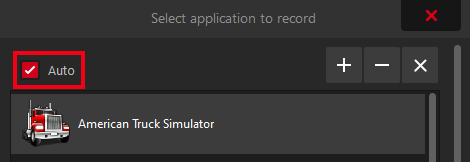
- To allow easier use of OriSound function (recording original audio directly from games and applications) a new Auto mode has been added. In this mode (with Game Mode and Selected Application as primary audio device) Action! will automatically switch audio source to selected/active game.
- Fixed AVerMedia GC573 4K HDR capture card sound support
- Added volume meter for primary and secondary (microphone) devices displayed on UI
- Added live sound playback (via PC speakers/headphones) of audio from capturing devices
- Fixed OriSound function not working properly with suspended UWP processes
Action! 4.18.0 is now available!
What's new in Action! 4.18.0?
- NEW FEATURE: Kernel Streaming (KSProxy) audio recording needed for capturing sound from capture cards like Elgato 4K60 PRO HDR (with this hardware it is now possible to record and livestream 4K/HDR video from Playstation 5 and Xbox Series X consoles)
- Fixed 7.1 audio downmix to stereo
- Improved OriSound (original soundtrack extraction from games and applications) function compliance with anti-cheat systems
Action! 4.17.1 is now available!
What's new in Action! 4.17.1?
- HOTFIX: Fixed mono microphone recording
Action! 4.17.0 with OriSound function (record audio only from selected application) is now available!
What's new in Action! 4.17.0?
- NEW FEATURE: OriSound - long-awaited feature that allows to record audio exclusively from selected game or application!
Don't waste money on additional PC or specialized headphones!
Now you can select your favorite voice chat application (like Discord) and record it into separate audio track that will not be mixed with main audio track!
Additionally the sound you record will never be modified by sound card post-processing - you always get the original volume, pitch and tone.
It will also not get disturbed by random system "blips" comming from popup windows etc.
HOW TO USE ORISOUND:
1. Use "Selected application" from audio device list (either primary, secondary or aux device).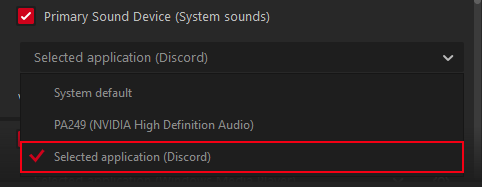
2. A window will appear showing currently detected sound sources in the system (from system audio mixer)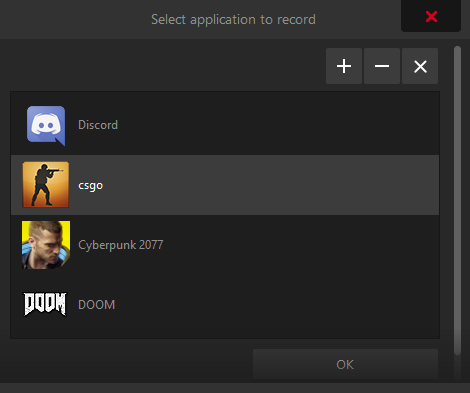
3. If the application you want record sound from is not running or is not visible on the list you can use the '+' button to select its exe file (you need to manually find its location first)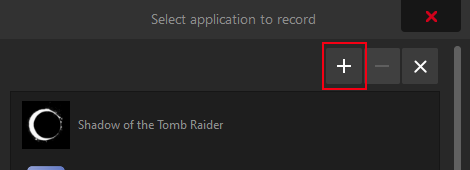
NOTES: This feature might not work for anti-cheat protected games and some games with spatial audio like Dolby Atmos. This will be improved soon in version 4.18.0. - Fixed CS:GO with Nvidia SLI enabled
- Support for duplicated monitors has been fixed
- Improved downmix of multi-channel audio to stereo
- Fixed HDR10 recording on AMD GPUs with latest AMD drivers installed
- Added fullscreen mode to JPEG XL viewer
- Stability fixes
Action! 4.16.1 is now available!
What's new in Action! 4.16.1?
- Important fixes for multi-GPU mobile devices
- Fixed video scaling problems in some situations
- Improved AMD Freesync and Nvidia G-Sync technology support
Action! 4.16.0 is now available!
What's new in Action! 4.16.0?
- Fixed YouTube API credentials expiration after one hour
- New JPEG XL (JXL) HDR capture fully compliant with final ISO/IEC 18181 JPEG XL standard
- Time-Shift possible in Screen Mode (last option on Screen Mode ribbon)
- Improved Nvidia DSR and AMD VSR support
- New Nvidia SLI recording engine (up to 40% performance improvement in Direct3D 12)
- Added possibility to record Vulkan SLI using Window capture mode (desktop capture must be used from windows picker)
- Improved AVI recording performance
- Improved CS:GO support
- Stability fixes
Action! 4.15.1 is now available!
What's new in Action! 4.15.1?
- HOTFIX: Fixed HDR detection for old HDR games
- HOTFIX: Fixed random Action! closing on Windows 10 Insider builds
Action! 4.15.0 is now available!
What's new in Action! 4.15.0?
- Added 32:9/21:9 to 21:9/16:9 real-time video cropping
- Added 360fps capture
- Improvements for latest Windows 10 Insider builds (HDR detection in windowed mode, display scaling etc.)
- Improved capture smoothness for various framerates
- HDR detection improvements
- Performance and stability improvements
Action! 4.14.1 is now available!
What's new in Action! 4.14.1?
- Fixed virtual display scaling support for Windows 20H2 version
- Fixed HDR10 support detection for AMD GPUs with newest drivers installed
- Stability fixes
Action! 4.14.0 with official support for YouTube HDR live streaming is now available!
What's new in Action! 4.14.0?
- NEW: Official support for YouTube HDR live streaming
- Fixed support for old GPUs with no DirectX 11 level 11.0 support
- Stability fixes
Read more about YouTube HDR Live Broadcasting below:
https://blog.youtube/news-and-events/seeing-believing-launching-hdr-live-streams/
Action! 4.13.1 with HDR10+ improvements is now available!
What's new in Action! 4.13.1?
- IMPORTANT FIX for MJPEG webcams
- IMPORTANT FIXES for some capturing devices
- Added HDR10+ metadata injection for Vulkan games and apps
- Fixed web overlay cropping
- Fixed web overlay positioning on video
Action! 4.13.0 with HDR10+ recording is now available!
What's new in Action! 4.13.0?
- Added HDR10+ real time meta data injection into captured HDR video streams
- Added software Motion JPEG webcam decoding
- Fixed desktop recording when display scaling or high DPI are enabled on Windows 10 version 20H2
- Performance optimizations for GPUs not supporting DirectX 11.1
- Fixed DirectX 8 scaling (for old games)
- Improved support for 4K HDR hardware capture cards
- Added support for Intel DG1 GPU (Intel multi GPU support)
- Fixed streaming to Facebook wall (using Account Manager)
Action! 4.12.2 with HDR Time-Shift is now available!
What's new in Action! 4.12.2?
- Improved HDR video upload to YouTube
- Added Time-Shift recording in HEVC and HDR formats
- Fixed webcam not appearing in Time-Shift with record webcam to separate file selected
- YouTube HLS streaming improvements
Action! 4.12.1 is now available!
What's new in Action! 4.12.1?
- HOTFIX: Fixed RTMPS streaming to Facebook (after latest Facebook server changes)
- HOTFIX: Fixed MP4 support in DaVinci Resolve and Vegas video editors
- HOTFIX: Fixed video stuttering in low frame rates (24fps etc.)
- Fixed HDR Vulkan capturing with disabled VSYNC
- Stability improvements
Action! 4.12.0 with YouTube HLS streaming is now available!
What's new in Action! 4.12.0?
- Added webcam and graphics overlays Z-order and horizontal and vertical flipping (right click on overlay to show context menu with options)
- Fixed MP4 support in DaVinci Resolve
- Added dynamic broadcast creation using YouTube API (old version will no longer work)
- Fixed direct HDR videos uploading to YouTube (created using AMD GPU hardware acceleration)
- Added HLS streaming to YouTube!
- Added HDR to SDR tone-mapping exposure control (function available in hardware acceleration settings popup)
- Added SDR to HDR overlay brightness control (function available in hardware acceleration settings popup)
- Stability improvements
Action! 4.11.0 with new Window recording mode is now available!
What's new in Action! 4.11.0?
- Added new, easier to use Window capture mode
- Fixed long MP4 recording (over 6 hours)
- Improved 8K recording in AVI format
- Added AMD GPU selection on systems with more than one AMD GPU
- Improved capturing performance on Intel GPUs
- Improved video preview on multi-GPU systems
- GUI improvements
There is one more version (4.12.0) coming this month that will include:
- Moving graphics overlays below or above other overlays (Z order)
- Horizontal/vertical flipping of graphics overlays
- Adding more audio tracks in a single MP4 file will be possible
- Audio equalizer showing current volume of different audio tracks before recording/streaming starts
- Nvidia constant QP mode (for advanced users)
- Exposure setting for HDR to SDR conversion
- Capturing popup windows in Window capture mode
- Time-Shift for Screen mode
Action! 4.10.5 with important fixes is now available!
What's new in Action! 4.10.5?
- Fixed YouTube login after latest Google API changes
- Fixed problems with some Nvidia mobile GPUs (920M etc.)
- Stability improvements
Action! 4.10.4 with important fixes is now available!
What's new in Action! 4.10.4?
- Added crash dump report uploading to cloud (upon user acceptance)
- Stability improvements
Action! 4.10.3 with important fixes is now available!
What's new in Action! 4.10.3?
- Fixed overlay graphics opening
- Added automatic Windows Error Reporting to improve support/bug fixing speed
Where to find and how to send crash dump report file?
To allow faster problem solving/bugfixing if you encounter an Action! crash please look into the crash folder that is created in Action!'s installation folder. There will be two files there named crashdump.dmp and a log file with your system specification (devices installed etc.) Please kindly send us these files if a crash occures and we will investigate them and provide a solution in the shortest possible time.
Action! 4.10.2 with important fixes is now available!
What's new in Action! 4.10.2?
- Fixed web overlay sounds playback
- Fixed compatibility with specific applications and games
- Added automatic logs that help in solving problems
How to use automatic log files?
Log files are created in Temp folder (this can be C:\Windows\Temp or C:\Users\UserName\AppData\Local\Temp).
Each application that is captured gets its own log file that is named "exe_name"_action.log.
The "exe_name" part can be found using Windows Task Manager.
Sending this file to Mirillis support team will shorten the time needed to resolve a problem.
Action! 4.10.1 with important fixes is now available!
What's new in Action! 4.10.1?
- Fixed problems with OpenGL support (X-Plane 11 crash etc.)
- Fixed Doom Ethernal not starting after latest update with Action Vulkan layer installed
- Fixed Facebook login from countries like Thailand
- Fixed AMD AMF HEVC and HDR10 support in Vegas editor
- Fixed some Vulkan BattleEye protected games not starting with Action Vulkan layer installed
- Stability improvements
Action! 4.10.0 with 8K recording and multiple displays in one video is now available!
What's new in Action! 4.10.0?
- NEW easy to use selected application window recording/streaming and recording/streaming of multiple desktops in a single video (link to video tutorial is available below)
- Added support for 8K MP4 video capture for newest Intel and Nvidia GPUs
- Fixed system/driver crash after hardware PlayReady 3.0 DRM is enbaled with Action! running
- Fixed 240fps recording in HDR mode
- Fixed Vulkan HDR capturing in active screen mode
- Stability improvements
Action! 4.9.0 with improved 240fps recording is now available!
What's new in Action! 4.9.0?
- CRITICAL FIX for Windows 10 version 2004 (May 2020 update)
- Improved 120/144/240fps recording (less frames are dropped)
- Added selected application window recording/streaming
- Fixed application hanging after logging in to an unverified Google/YouTube account
- Time-Shift maximum duration is now 30 minutes
We advise to record/stream Vulkan applications in Game mode (capturing Vulkan in HDR in Screen mode is currently not supported).
Action! 4.8.1 with 240fps recording is now available!
What's new in Action! 4.8.1?
- Important fix for hardware capturing devices support
Action! 4.8.0 with 240fps recording is now available!
What's new in Action! 4.8.0?
- Added 240fps video capture (Use with caution! May not work on all system configurations and in HDR. Not recommended above 1080p)
- Important fix for constant frame rate (CFR) recording/streaming when CPU/GPU loads are high
- Further stability fixes/improvements for DirectX 10/11/12 capturing when Alt+Tab (entering/leaving fullscreen mode) is being used
- Fixed wrong HDR detection after using Alt+Tab (entering/leaving fullscreen mode) in some situations
- Added new 1440p and 2160p predefined video size profiles
- Fixed application hanging after URL source enabling/disabling (using tick button or hotkey)
- Fixed some URL sources not displaying properly
Action! 4.7.0 with World's first JPEG XL screenshot capturing in HDR10 is now available!
What's new in Action! 4.7.0?
- NEW FEATURE: JPEG XL screenshot capturing in true HDR10 is now possible!
- Microphone volume boost to 200% level is now possible
- HUD is now rendered in true HDR for HDR desktop and HDR games using 64 bits per pixel color
- Fixed Alt+Tab crashing in some DirectX 10/11 games and applications
- Improved ST.2084/BT.2020 HDR10 video signaling
- Fixed randomly corrupted (green) recordings using hardware accelerated HEVC encoding on Nvidia GPUs
- Fixed maximum allowed AMD AMF (VCE 1.0 to 4.1) video encoder resolution
Action! 4.6.0 with improved HDR10 recording is now available!
What's new in Action! 4.6.0?
- Fixed active screen switching (on accounts without administrator rights)
- Fixed desktop capture on multi-GPU systems (on accounts without administrator rights)
- Fixed cursor position when recording regions on multiple desktops (other than primary)
- Fixed desktop capture when non-native resolution with non-native aspect ratio is selected
- Fixed Vulkan HUD not refreshing when recording/streaming is started
- Fixed support for very long streamkeys (used by Booyah live streaming service)
- Fixed not detecting specific applications as active
- Reduced minimum streaming bitrate value for 60fps
- New 30% smaller installer
- OpenGL capture fixes
- GUI improvements
Action! 4.5.0 with improved HDR10 recording is now available!
What's new in Action! 4.5.0?
- Fixed 4K/HDR video player not starting with hardware acceleration enabled by default
- New improved desktop video capture engine for accounts without administrator rights (guest account)
- HDR desktop capture on accounts without administrator rights is now possible
- Fixed problems when running Action! on multiple accounts at the same time (administrator and guest)
- Fixed support for older Intel GPUs running with old drivers or drivers that cannot be updated
Action! 4.4.0 with improved HDR10 recording is now available!
What's new in Action! 4.4.0?
- HOTFIX: Fixed Doom Eternal recording in Vulkan HDR10 mode
- HOTFIX: Improved OpenGL support on notebooks with two GPUs (integrated and high performance)
- HOTFIX: Improved Minecraft (JAVA edition) support (still the HUD is wrongly displayed in some views since version 1.13)
- Fixed compatibility with Intel GPUs when old drivers are installed or GPU does not support NV12 format
- Reduced number of requests to YouTube API Services
- Live viewers count is disabled by default
Action! 4.3.1 with improved HDR10 recording is now available!
What's new in Action! 4.3.1?
- HOTFIX: Fixed problems with GPUs not fully supporting DirectX 11.1 features
- Fixed region recording using Intel GPUs
Action! 4.3.0 with improved HDR10 recording is now available!
What's new in Action! 4.3.0?
- Improved Vulkan performance
- Fixed desktop recording when Windows 10 virtual scaling is enabled (desktop resolution is not monitor's native resolution)
- Fixed pause when no audio is recorded or no audio devices are present in the system (video only)
- Added YouTube permissions revocation after logging out in account manager
- Added Discord to built-in exclude list
Action! 4.2.0 with improved HDR10 recording is now available!
What's new in Action! 4.2.0?
- NEW: Real-time preview in HDR10!
- NEW: HDR10 recording/capture now available on newest AMD Vega GPUs!
- Automatic switching to SDR encoder when first video frame is not in HDR
- Fixed problems with detecting HDR video (integration with NVIDIA NVAPI and ADM AGS API for HDR output detection)
- Fixed corrupted video colors by incorrectly detecting RGB10 SDR video as HDR
- Fixed ST2048/BT2020 gamma detecting in DirectX 12 by implementing missing Windows 10 functionality
- Improved HDR10 video quality
- Fixed problems with performance on AMD RX 5700 and other new AMD GPUs (SDR encoders for all GPU vendors now work in NV12 format)
- Fixed problems with Alt-Tab in DirectX 12
- Added system sound volume boost to 200% (fixes too quiet audio recording)
Action! 4.1.2 with HDR10 recording is now available!
What's new in Action! 4.1.2?
- Fixed HDR10 glitch during video start after uploading to YouTube
- Improved HDR video source detection
Action! 4.1.1 with HDR10 recording is now available!
What's new in Action! 4.1.1?
- HOTFIX: Important fix for DirectX 9 and 10
Action! 4.1.0 with HDR10 recording is now available!
What's new in Action! 4.1.0?
- HDR10 recording improvements (fixed invalid colors in 600+ nits etc.)
- Added high quality webcam and overlays rendering on HDR video
- New high quality HDR10 to SDR real-time video conversion
- Added support for high quality HDR video screenshots
- Fixed crashing in DirectX 12 in SLI/Crossfire setups
- Up to 120fps 4K video capture in SDR mode with SLI/Crossfire
- Fixed HDR10 recording in DirectX 12 in SLI mode (not recommended, performance might be lower then in non-SLI mode)
- Fixed problems when monitor is switching to fullscreen exclusive mode in HDR mode
- Increased default video quality from Normal to High (Ultra is recommended for best quality)
- Improved Vulkan recording performance
- Added support for recording Vulkan in HDR10 mode
- Stability fixes
Action! 4.0.4 with HDR10 recording is now available!
What's new in Action! 4.0.4?
- Fixed YouTube login using account manager (for some accounts)
- Fixed Twitch login on Windows 7 and Windows 8 using account manager
- Fixed D3D10 and D3D10.1 support in DXGI 1.1 mode using new capturing engine
- Fixed region recording on Windows 7 in MP4 mode
- Fixed region recording on Windows 8/8.1/10 in AVI mode
- Fixed Nvidia SLI support (capturing in SLI mode is not recommended and may not work for Direct3D 12, HDR10 recording does not work in SLI mode)
- Fixed SRGB video capturing in AVI and cross-GPU modes
- Fixed support for systems with AMD GPU and Intel GPU working together
- Fixed support for 1366x768 displays
- Fixed black recordings in some situations with scaling enabled
- Fixed crashing when no audio devices are available in the system
- Fixed recording/streaming in odd resolutions
- Fixed Mirillis Vulkan layer reducing framerate when Action is not running (more Vulkan performance fixes and Vulkan HDR recording coming in 4.0.5 update)
Action! 4.0.3 with HDR10 recording is now available!
What's new in Action! 4.0.3?
- New capturing/recording engine for DirectX 9Ex/10/11/12/OpenGL (up to 2x performance optimisation)
- HDR10 (10bit) recording/encoding has been added. Windows 10 and a HDR monitor connected with DisplayPort 1.4 is recommended (but HDMI 2.0 will also work). Please enable HDR/Wide Color Gamut in Windows 10 display settings for selected monitor.
When using USB-C for laptops connected via HDMI adapter problems may occur (USB-C to DisplayPort 1.4 cable is recommended).
To use HDR10 mode please check Hardware Acceleration list in Action 4 video tab (main view) and select Intel or Nvidia HDR10. - Added HEVC support for Intel and AMD GPUs
- Increased maximum recording bitrate to 200Mbps (useful for 4K@60fps HDR10 recording)
Action! 3.10.2 is now available.
What's new in Action! 3.10.2?
- Fixed OpenGL upside down recording on AMD GPUs
- OpenGL recording improvements
Action! 3.10.1 is now available.
What's new in Action! 3.10.1?
- Fixed support for AMD RX 5700 and newer GPUs
Action! 3.10.0 with Mixer integration is now available.
What's new in Action! 3.10.0?
- Added integration with Mixer
- Fixed Vulkan recoding/streaming (No Man's Sky etc.)
- Fixed live user count number on HUD for Twitch
- Fixed support for DLive streaming platform
- Stability fixes
Action! 3.9.6 is now available.
What's new in Action! 3.9.6?
- Added support for ARGB32 webcam drivers (with software removed background)
Action! 3.9.5 with Rage 2 support is now available.
What's new in Action! 3.9.5?
- Added full support for Rage 2 (Vulkan with HUD and streaming overlays)
- Fixed support for Elgato HD 60S (32-bit mode is no longer supported by Elgato drivers)
Action! 3.9.4 is now available.
What's new in Action! 3.9.4?
- Fixed long Action! closing when suspended UWP processes/games are running in the background
- GUI improvements
Action! 3.9.3 with RTMPS secure streaming is now available.
What's new in Action! 3.9.3?
- Added RTMPS secure streaming support
- Added RTMPS support for Facebook LIVE (required after May 1st 2019 FB API update)
- Fixed problems with UWP/Windows Store Apps recording/streaming after minimizing/restoring them
Action! 3.9.2 is now available.
What's new in Action! 3.9.2?
- IMPORTANT fix for recording/streaming 64-bit games and applications
- VERY IMPORTANT fix for games using BattleEye and Easy Anti-Cheat systems (ie. Fortnite after latest anti-cheat system update could crash after connecting with Action!)
Action! 3.9.1 is now available.
What's new in Action! 3.9.1?
- Improved compatibility with Intel DCH drivers (because of problems generated with these drivers we strongly recommend rolling back to non-DCH drivers)
- Fixed Focusrite Scarlette device recording
- Improved microphone/system sound volume notification on HUD (more visible at low volumes)
- Improved hardware accelerated Motion JPEG decoding
- Added Korean language support
Action! 3.9.0 with Time-Shift in RAM is now available.
What's new in Action! 3.9.0?
- Increased maximum Time-Shift duration
- Added Time-Shift enable/disable hotkey (default: Ctrl + T)
- Added Time-Shift in RAM mode (HDD/SSD won't be hogged anymore!)
- Fixes problems with Logitech C920 webcam support after latest driver updates
Action! 3.8.0 with full support for recording/streaming Microsoft Store/UWP apps is now available.
What's new in Action! 3.8.0?
- Added full support for recording/streaming Microsoft Store/UWP apps (please make sure to remove any excluded UWP apps from Action!'s exclude list)
- Fixed problems with recording 64-bit DirectX 9 applications
Action! 3.7.2 is now available.
What's new in Action! 3.7.2?
- Fixed compatibility with Activision products (COD WW2, Black Ops and other new titles)
- Stability improvements
Action! 3.7.1 with custom MP4 bitrate setup is now available.
What's new in Action! 3.7.1?
- Added possibility to force custom MP4 video bitrate (select from 1 to 100Mbps in video settings)
- Added recording start delay counter (available in general settings)
- Added hotkeys for showing/hiding Browser Source overlays (in hotkeys settings)
- Enabled changing of audio volume (microphone or other audio device) during recording/streaming
Action! 3.7.0 with MP4 recovery and microphone noise reduction is now available.
What's new in Action! 3.7.0?
- NEW FEATURE: Automatic repair of corrupted MP4 and M4A recordings! (Now you will never lose any recording even when power gets cut off or your system crashes during recording)
- NEW FEATURE: Advanced microphone noise suppression has been added (configuration in microphone settings)
- NEW FEATURE: System performance monitor displayed on HUD with lots of useful information like CPU/GPU usage CPU/GPU RAM usage, CPU temperature and network adapter usage (plugin installation needed - read more on Mirillis Facebook)
- Fixed drawing panel translations for some languages
Action! 3.6.1 is now available.
What's new in Action! 3.6.1?
- HOT FIX: Recording microphone in audio recording mode has been fixed (mono sound was recorded instead of stereo)
- Time-shift is now reset after closing application/game to which it was connected (this allows easy switching between applications)
Action! 3.6.0 is now available.
What's new in Action! 3.6.0?
- Action! UI has been reorganized to allow easy setup of up to 3 audio sources in the main application view
- Switching between recorded applications in game recording mode has been fixed
- Fixed Windows 10 display scaling support (in full screen and region mode)
- Added microphone and system sound volume notifications on HUD
- Added microphone pan/balance setup (in microphone settings)
- Added Turkish and Hungarian translations
- Translation improvements
Action! 3.5.5 is now available.
What's new in Action! 3.5.5?
- Fixed auxilary audio recording (to separate file) when recording is started with time-shift running in the background
- Action! language translations are now stored in XML files for easy creation of new localizations (lang and lang_ex folders)
- GUI improvements
- Stability fixes
Action! 3.5.4 is now available.
What's new in Action! 3.5.4?
- IMPORTANT fix for systems with Nvidia SLI setup with no H.265/HEVC encoding support (NVENC was not used for encoding)
- Fixed closing/crashing of some Windows Store Apps when Action! was running (UWP applications must be recorded in Active Screen mode from now on)
- Automatic detection of UWP applications and excluding them from monitoring
- Fixed adding of exluded processed from restricted locations (like Windows Store Apps)
Action! 3.5.3 is now available.
What's new in Action! 3.5.3?
- Fixed streaming with very low bitrate (under 0.8Mbps)
- Fixed recording in software mode with bitrate above 60Mbps
- Fixed microphone/webcam hotkey when Ctrl/Shift or Alt is pressed
Action! 3.5.2 is now available.
What's new in Action! 3.5.2?
- IMPORTANT live streaming stability and video quality improvements for Intel/Nvidia/AMD GPUs
Action! 3.5.1 is now available.
What's new in Action! 3.5.1?
- HOT FIX: streaming to Twitch error #3000 has been fixed
- HOT FIX: green/corrupted video while streaming to YouTube has been fixed
- Fixed maximum Ultra quality bitrate when encoding with Intel Quick Sync Video acceleration
Action! 3.5.0 is now available.
What's new in Action! 3.5.0?
- Big improvements in live streaming quality (strict-CBR, AMD AMF improvements and more...)
- Selection between Variable and Constant framerate (with automatic fallback to VFR when performance is not good enough for CFR)
- 120 and 144fps (HFR) MP4 recording (for slow motion purposes)
- Support for 120 and 144fps playback in ActionPlayer
- Excluded processes list is now supported within Action! (Settings->General->Advanced settings group)
- Fixes for the latest Windows 10 update
Action! 3.4.0 is now available.
What's new in Action! 3.4.0?
- Large improvements in video recording performance (with vsync disabled)
- Fixed problems with recording on systems that have virtual surround software installed (like Nahimic)
- Improved high bitrate AVI recording on systems with hybrid hard disks (SSD + HDD). We still recommend normal HDD or SSD for high bitrate video recording
- Browser overlays now accept keyboard input (for example you can logon to YouTube to allow YouTube chat overlay)
- Fixed Action! not working properly from certain disk locations
- Audio/Video desynchronization when streaming during high CPU usage has been fixed
- Fixed frame stuttering when recording video from Elgato/Hauppauge and other devices that capture MPEG-2 transport stream
- Fixed AVI freezing during high CPU usage
- Fixed webcam stuttering during high CPU usage
Action! 3.3.0 is now available.
What's new in Action! 3.3.0?
- Added advanced Time-Shift settings (maximum swap-file size and location - this allows to offload SSD disk from continuous storage of time-shifted video data)
- Time-Shift saving is now done in background (not blocking)
- Added recording webcam to a separate AVI video file (for video editing purposes). Available via Webcam Settings (Capture Mode)
- Added Nvidia GPU selection that will be used to perform hardware acceleration (available via Hardware Acceleration Settings in main screen)
- Fixed webcam/microphone showing/recording on button down (in the On/Off mode)
- Added automatic stretching of 1440x1080 video content to 1920x1080 (to remove black vertical bars)
- Fixed Vulkan error message on some systems
- Fixed free disk space calculation
Action! 3.2.0 is now available.
What's new in Action! 3.2.0?
- Added Vulkan support
- Added HDR recording in SDR format (64bit to 32bit color conversion)
- Added benchmarking file format selection (HTML or CSV formats are available)
- Important stability fixes (on Action! startup, memory leaks etc.)
- Fixed Time-Shift crashing in 4K
- Fixed low-disk space information on HUD in 4K
- Fixed memory leak on x64 systems with recent Windows 10 updates installed
Action! 3.1.6 is now available.
What's new in Action! 3.1.6?
- Added browser source cropping
- Added browser source preview in overlay source settings
- Added ability to navigate browser source (click, scroll etc.)
- Fixed saving last desktop screenshot monitor selection
- Fixed recording pausing with multiple audio tracks stored to separate files
- Enabled graphics overlay changing during recording/streaming
- When recorded application/game crashes recording/streaming is not stopped and can be seamlessly continued after relaunching game/application (in MP4 mode)
- Stability fixes
- GUI improvements
Action! 3.1.5 is now available.
What's new in Action! 3.1.5?
- Added 4K/UHD (150%/150DPI) mode for user interface (Settings->General->User interface size)
- Added Action! fullscreen GUI mode
- Added 4K/UHD mode for drawing panel
- Improved GUI readability on small displays
- Fixed browser source on HUD refresh rate with drawing panel visible
- Fixed help language selection
Action! 3.1.4 is now available.
What's new in Action! 3.1.4?
- 4K/UHD (150% size) HUD for resolutions above 2560x1440
- Moved browser/URL sources setup to live streaming tab
- Moved selected (private) application recording setup from video settings to main video tab
- GUI improvements (duration editing with editbox etc.)
Action! 3.1.3 is now available.
What's new in Action! 3.1.3?
- Performance improvements in device recording mode with recording preview enabled
- Stability fixes
Action! 3.1.2 is now available.
What's new in Action! 3.1.2?- Updated RTMP servers for Twitch and Smashcast services (please make sure that you have the correct streaming server set after the update)
- Fixed Action! long startup time
- Fixed push to talk mouse hotkey assignment
- Added Webcam size/position controls in Webcam Settings window (like in Action! version 2.x)
- Improved webcam cropping
- Disabled changing video composition during recording (to not allow accidental overlay layout change)
- Fixed problem with dissapearing preview when recorded game/application does not refresh
- AVI recording preformance improvements
- Fixed problem of not locking Action! to selected 3D application (if more then one is running)
- Fixed conflict of Action! HUD with Uplay and Steam overlays
- Added disabling of fast OpenGL recording path on Intel GPUs (where problems occur which pixelated video)
- to enable this workaround please place an empty slowintel.txt file in Action! installation folder
Action! 3.1.1 is now available.
What's new in Action! 3.1.1?- Critical fix for Windows 7 (HW accelerated webcam decoding initialization could crash Action! on startup on old Intel drivers)
- Fixed support for Angle engine
- Added recording timer (like in version 2.x)
- Added streaming icons in status bar
- Fixed audio only recording duration
Action! 3.1.0 is now available.
What's new in Action! 3.1.0?- IMPORTANT: this update is required for compatibility with new Windows Spring Creators update!
- NEW FEATURE: hardware accelerated (on selected Intel CPUs) 4K/UHD Webcam recording (for example Logitech Brio 4K webcam up to 4K/30p or even 60p - no lags or frame dropping), setup under settings->video tab
- Fixed problem with assigning multiple keys as hotkeys (CTRL or SHIFT + other keys)
- Audio recording tab again available
- Fixed OPENGL recording performance on NVIDIA and AMD GPUs (4K/60p recording)
- Hardware accelerated scaling of OPENGL games and applications in AVI and MP4 mode (on NVIDIA and AMD GPUs)
- Fixed problem with attaching to games with launchers (in game recording mode). It is now possible to easly switch between multiple games/launchers running at the same time)
- Fixed switching between multiple games in preview mode
- Private application recording mode again available (setup under settings->video tab)
- Fixed SSE2 support for old AMD CPUs
- Added notification about video capture/streaming and audio recording by highlighting tabs
- GUI improvements
- Stability fixes
Action! 3.0.0 is now available.
We are proud to announce that new Action! 3.0 is now available, with modern look & feel and tons of new features!- NEW FEATURE: Live preview of video composition
- NEW FEATURE: Accounts manager (YouTube, Facebook etc.)
- NEW FEATURE: Drawing Panel (draw shapes and texts over any borderless windowed games in real time!)
- NEW FEATURE: Lots of performance improvements and fixes
- NEW FEATURE: Support for web browser overlays
- NEW FEATURE: New advanced multi-layer HUD (view chat overlay over any streamed game!)
- NEW FEATURE: Support for 4K webcams
- ...so many more that there is not enough space here to write them down :)
Read more and download the latest Action! version
Action! 2.8.1 is now available.
What's new in Action! 2.8.1?- Important fix for Windows 8.1 and Windows 10 desktop/screen recording
Read more and download the latest Action! version
Action! 2.8.0 is now available.
What's new in Action! 2.8.0?- Added possibility to record selected audio device (ie. microphone) to a separate audio file. Check Recording microphone to separate audio file for game and screen recordings tutorial to learn more.
- Added support for Elgato Game Capture HD60 S device (USB 3.0 required)
- Improved Elgato capturing devices support
- GUI improvements
Read more and download the latest Action! version
Action! 2.7.4 is now available.
What's new in Action! 2.7.4?- Fixed fullscreen desktop recording after recording downscaled desktop region
- Added scrollable hotkeys settings
Read more and download the latest Action! version
Action! 2.7.3 is now available.
What's new in Action! 2.7.3?- NEW FEATURE: Microphone volume indicator on HUD (during recording)
- Improved Hauppauge device detection
Read more and download the latest Action! version
Action! 2.7.2 is now available.
What's new in Action! 2.7.2?- Improved microphone/system sound volume balance (added possibility to set both microphone and system sound level to 100%)
- Added automatic volume normalization to minimize loud sound distortions when mixing microphone/system sound to one audio track
- Fixed microphone volume when recording microphone to separate audio track
- Removed system microphone volume setting (hardware volume must be set using operating system settings)
- Fixed crash when recording specific desktop region size with upscaling
- Fixed installer for Intel RealSense version
Read more and download the latest Action! version
Action! 2.7.1 is now available.
What's new in Action! 2.7.1?- IMPORTANT: Fixed HUD hiding and hide HUD on Action! startup on Windows 7 and Windows 8 (corrupted desktop was visible)
- Added possibility to assign -,+,[,],\,:,' as hotkeys
- Improved support for Avermedia C835 and C875 capture cards (supports both StreamEngine and Raw MPEG-2 capture)
Read more and download the latest Action! version
Action! 2.7.0 is now available.
What's new in Action! 2.7.0?- NEW: Added HUD opacity setting (available for Windows 7/8/8.1/10 Desktop, D3D9, D3D10, D3D11, D3D12 and OpenGL)
- NEW: Added support for Hauppauge PVR devices
- Improved not recording visible HUD in desktop mode for Windows 7/8/8.1/10 (visible on screen but not recorded)
- Improved 10bit-per-pixel desktop recording (automatic detection of 30bit color desktop for NVIDIA Quadro and AMD FirePro GPUs)
- Support/automatic detection for setups with both 10bit-per-pixel and 8bit-per-pixel monitors connected
- Fixed sRGB video recording with multi-sampling enabled (D3D10/D3D11)
- Fixed all major problems with OpenGL recording on AMD GPUs
- Fixed recording performance for some OpenGL games
- Fixed crashing when recording old OpenGL games
- Fixed support for recording sRGB OpenGL applications
- Fixed out of memory crash when recording/streaming 32bit games and applications that use lots of memory
- Improved recording performance of Direct3D 9 games/applications (up to 25% performance increase)
- Fixed problems with HUD hide/position change and screenshot hotkey detection
- Fixed Farming Simulator 17 game recording
- Overall performance improvements
Read more and download the latest Action! version
Action! 2.6.2 is now available.
What's new in Action! 2.6.2?- Fixed desktop detection after returning from standby/suspend state
- Fixed desktop detection after returning from login state
Read more and download the latest Action! version
Action! 2.6.1 is now available.
What's new in Action! 2.6.1?- Fixed support for Windows 10 virtual desktop scaling
- Fixed recovery of desktops after exiting fullscreen exclusive mode games/applications
- Multi-display stability fixes
- Fixed support for some OpenGL games/applications
- Fixed description setting for YouTube live-streaming
Read more and download the latest Action! version
Action! 2.6.0 is now available.
What's new in Action! 2.6.0?- Facebook login credentials are now valid for 30-60 days
- Improved mouse cursor synchronization in desktop recordings
- Improved recording performance
- Fixed recording of some OpenGL games/applications
- Fixed Audio Input/Output device selection on startup when device has beed removed from system
- Livestreaming logon credentials are not checked when livestraming is disabled
- Fixed region recording on systems with multi-DPI display configuration
Read more and download the latest Action! version
Action! 2.5.5 is now available.
What's new in Action! 2.5.5?- Application stability improvements
Read more and download the latest Action! version
Action! 2.5.4 is now available.
What's new in Action! 2.5.4?- Application stability fixed when running Action! in offline mode
Read more and download the latest Action! version
Action! 2.5.3 is now available.
What's new in Action! 2.5.3?- 4K live streaming - added possibility to live stream videos up to 4K resolution using Original video size option
- Stability improvements
Read more and download the latest Action! version
Action! 2.5.2 is now available.
strong>What's new in Action! 2.5.2?- Added RTP/UDP/IGMP streaming (via custom URL address)
- Fixed custom RTMP streaming
- Fixed streaming to restream.io
- Fixed cancelling of Time-Shift recordings
- Installer improvements
- GUI improvements
Read more and download the latest Action! version
Action! 2.5.1 is now available.
What's new in Action! 2.5.1?- Added support for Smashcast LIVE Streaming service
- Important improvements for video recording with AMD APP acceleration
- GUI improvements
- Stability improvements
Read more and download the latest Action! version
Action! 2.5.0 is now available.
What's new in Action! 2.5.0?- Added 150% GUI size for displays larger than 2560x1440
- Added 150% HUD size for displays larger than 2560x1440
- Added information about GPU used for active screen/application rendering
- Added 4K/UHD MP4 recording on AMD GPUs
- Added 4K/UHD hardware accelerated video exporting on AMD GPUs
- Added ability to set title of YouTube/Facebook/Twitch live streams
- Fixed 8K x 8K virtual screens screenshots
- Fixed recording of windowed games/applications (multiple application switching)
- Fixed HUD rendering when more then 1 GPU outputs video
- Addded Start/stop LIVE streaming button for region mode
- GUI improvements
- Stability improvements
Read more and download the latest Action! version
Action! 2.4.1 is now available.
What's new in Action! 2.4.1?- Improvements for Windows 10 Creators Update running on systems with Nvidia GPU
- Fixed Action! stability in device recording mode when device is disconnected
Read more and download the latest Action! version
Action! 2.4.0 is now available.
What's new in Action! 2.4.0?- Added support for Elgato capturing devices
- Fixed multiple window recording/switching
- Added possibility to start recording in game mode using both hotkey or start button
- Windows 10 Creators Update fixes (multiple display support, text rendering)
- GUI fixes
Read more and download the latest Action! version
Action! 2.3.0 is now available.
What's new in Action! 2.3.0?- NEW FEATURE: Webcam/HDMI capture device recording mode (allows recording of game consoles with HDMI capture device connected)
- Fixed webcam recording in AVI without mouse cursor recording turned on
- HUD displays actual framerate during recording (current vsync per second, average fps shows recording framerate)
- Improved webcam recording with alpha channel (Intel RealSense and chroma key)
- Action! restart is no longer needed to switch webcam capturing resolution
- Selected application (private recording) mode has been moved to Active Screen recording mode as an option
- New improved Action! Player
Read more and download the latest Action! version
Action! 2.2.1 is now available.
What's new in Action! 2.2.1?- Fixed Action! startup without any audio input devices present
- Fixed AVI recording on systems with 16+ core processors
- Important change: video recordings are not stopped when using Alt-Tab in Games and applications recording mode
- New: Added tutorials showing basic Action! features
- Minor GUI changes: changed hardware acceleration selection for recording/streaming
Read more and download the latest Action! version
Action! 2.2.0 is now available.
What's new in Action! 2.2.0?- Fixed livestreaming disconnection when broadcasting on systems with AMD GPU
- Improved livestreaming constant bitrate output
- Added 2 input devices recording (ex. 2 microphones at the same time)
- Added mono system sound recording
- Fixed Action! startup when livestreaming login credentials have expired
- New engine for selected window recording (private window recording - not showing other windows to viewers)
- New method of showing information about updates
- Stability fixes
Read more and download the latest Action! version
Action! 2.1.0 is now available.
What's new in Action! 2.1.0?- NEW FEATURE: Full live streaming/login API integration with Facebook, YouTube, Twitch and Hitbox
- NEW FEATURE: Real-time live streaming viewers counter statistics displayed on HUD
- Live streaming start button added
- Live streaming privacy selection for Facebook and YouTube
- Recording performance fixed on specific Win10 systems
- Fixed Facebook video uploading
- Fixed Action! startup with Elgato device installed
- Fixed Action! AVI recording when very large cursors are visible (ex. Photoshop)
- Fixed OpenGL recording (Intel GPU ex. Minecraft)
- Fixed OpenGL recording (Exanima game)
- Stability fixes
- GUI improvements
Read more and download the latest Action! version
Action! 2.0.7 is now available.
What's new in Action! 2.0.7?- Reverted possibility to assign CTRL for Start/Stop video recording
- Fixed Live Streaming Auto-reconnect function
- Added option to assign custom hotkey to Start/Stop Live Streaming
Read more and download the latest Action! version
Action! 2.0.6 is now available.
What's new in Action! 2.0.6?- Application stability improvements
- Application installer improvements
Read more and download the latest Action! version
Action! 2.0.5 is now available.
What's new in Action! 2.0.5?- Important: DirectX 12 games recording performance improved
- Ultra video quality preset added (Video settings) for ultra quality, high bitrate MP4 video recordings
- Stability improvements (memory leaks fixed)
Read more and download the latest Action! version
Action! 2.0.4 is now available.
What's new in Action! 2.0.4?- Fixed Battlefield 1 DirectX 12 gameplay recording
- Updated Twitch servers list
- Application installer improvements
Read more and download the latest Action! version
Action! 2.0.2 is now available.
What's new in Action! 2.0.2?- Application stability improvements
- Application installer improvements
Read more and download the latest Action! version
Action! 2.0.1 is now available.
What's new in Action! 2.0.1?- Fixed Battlefield 1 DirectX 12 gameplay recording
- Fixed DirectX 11/12 games and applications recording in windowed mode
- Fixed Action! startup problem with Avermedia capture hardware/software installed
- Improved graphics overlay alpha blending quality
Read more and download the latest Action! version
Action! 2.0 is now available.
We are proud to announce that new Action! 2.0 is now available, with refreshed look & feel and new features! We are also happy to announce that upgrade to Action! 2.0 is free for all Action! 1.x version users!
What's new in Action! 2.0?- NEW FEATURE: Chroma Key option added for webcams recording and LIVE streaming
- NEW FEATURE: LIVE Streaming to Facebook
- NEW FEATURE: Selected application recording mode added to record video from selected application only
- NEW FEATURE: Option to show free disk space on Action! HUD
- NEW FEATURE: "Do not record HUD during desktop recording" option added
- NEW FEATURE: Microphone off delay added for microphone recording on button down
- New, modern user interface with redesigned settings categories
- Improved webcam preview
- Refreshed Export window with new, redesigned output profiles
- Fixed video uploading to Facebook
- Assigned a separate hotkey for Live streaming
- Fixed mouse problem experienced during RUST game recording
- Windows Logon screen and UAC screens recording performance improvements for Windows 8.1 or newer on Admin user
- Fixed fullscreen and region Windows desktop recording with upscalling (on Windows 7 without Aero and on 8.1/10 on onon-admin user)
- Fixed YouTube fullscreen video recording on Windows 10 with AMD graphics cards
- Webcam recording stability improvements
- Stability improvements
- User interface improvements
- Action! installer improvements
- Perfect Video Match mode has been removed
- Remote Action! functionality has been removed. Remote PC access and gaming is now available as a separate product - Monflo. Download Monflo for free at: monflo.mirillis.com
- Simply download the latest Action! 2.x.x installer and install it on your PC! To activate Action! 2.0 use your current serial number (activation key) from version 1.x.x.
Read more and download the latest Action! version
Action! 1.31.5 is now available.
What's new in Action! 1.31.5?- 4k Windows desktop video recording stability improvements (for recording 4k Windows Logon screen, 4k Windows screen without Windows Aero, 4k Windows screen on normal (non-admin) Windows user)
- User interface improvements
Read more and download the latest Action! version
Action! 1.31.4 is now available.
What's new in Action! 1.31.4?- Important fix for Windows 10 desktop recording with the latest Windows 10 Anniversary Update installed.
- Important fix for exporting/uploading to YouTube (Fixed problem with message reporting old/unsupported browser)
Read more and download the latest Action! version
Action! 1.31.3 is now available.
What's new in Action! 1.31.3?- Fixed Action! HUD visibility for DOOM game.
Read more and download the latest Action! version
Action! 1.31.2 is now available.
What's new in Action! 1.31.2?- Stability fix for closing webcam preview window
Read more and download the latest Action! version