We present an excerpt from a conversation with Paweł Hładkiewicz, the CEO and CTO of Mirillis, about “Cybersecurity in Remote Access”. This interview is part of a podcast series hosted by the top cybersecurity authority in Poland (Niebezpiecznik.pl). The entire conversation is available to listen to in Polish on the Spotify platform.
Niebezpiecznik.pl: Let me start by saying that I think people started taking remote access security seriously after the pandemic. Afterward, we observed a rash of remote desktop scams, which are essentially social engineering rather than a breach of remote access security. In our security practice, we’ve seen various cases. For example, an accountant shared her computer so employees could use her program to issue invoices. Paweł, what problems do you see most often?
Paweł Hładkiewicz: Hello! The pandemic triggered a boom in all kinds of remote access – remote desktops, video conferencing, and more. Many people were unaware of the risks involved. For instance, on Zoom, users sometimes joined other people’s meetings instead of their own. Furthermore, there was a scandal in the U.S. government where all traffic was routed through foreign servers. Files stored on those servers could even be edited because there was no proper encryption. It’s important to stay alert to social engineering tactics. Some people were robbed after someone told them they would access their computer and help them invest money.
Niebezpiecznik.pl: Criminals have always emphasized the legitimacy of programs like AnyDesk and TeamViewer. They convince victims that these are legal tools used by major companies and banks, and that they should be downloaded from the official website. They also assure people that the software is completely safe.
PH: Since we are talking about our German competitors, I won’t hide the fact that there have been quite a few interesting situations. For example, a customer of TeamViewer – an accounting company – once asked me how TeamViewer knows they are using the software for commercial purposes. Isn’t that a bit suspicious? Another concerning case involves AnyDesk, which was attacked in February 2024 with a state-based attack. Someone likely used social engineering to access their servers and extract their digital signing certificates. The company later advised users to update the software, change passwords, and so on. While those steps are important, the real question is: how could such a serious company allow someone to steal digital certificates, which are typically stored on dongles and protected by a PIN? At our company, only two people have access to the final digital signing of software. We don’t have any machines that allow developers to build and sign software from the command line because no PIN is needed. What if someone were to hide on the server, pull out the software, sign it, and release it on their own servers? The digital signature is unique. In our company there is no way for an unauthorized person to gain access, sign malicious code, and distribute it under our name.
Niebezpiecznik.pl: Solutions like AnyDesk, TeamViewer, and your own are designed for sensitive communication. Earlier, you mentioned the history of various attacks. In 2016, numerous reports on Reddit and Twitter surfaced about TeamViewer accounts being compromised. At first, TeamViewer claimed this was due to poor password hygiene. However, it later turned out the issue was more serious. In 2019, FireEye reported that the APT41 group had hacked them. But let’s start with the issue of user hygiene because not everyone cares about it. Does your solution enforce the use of strong passwords?
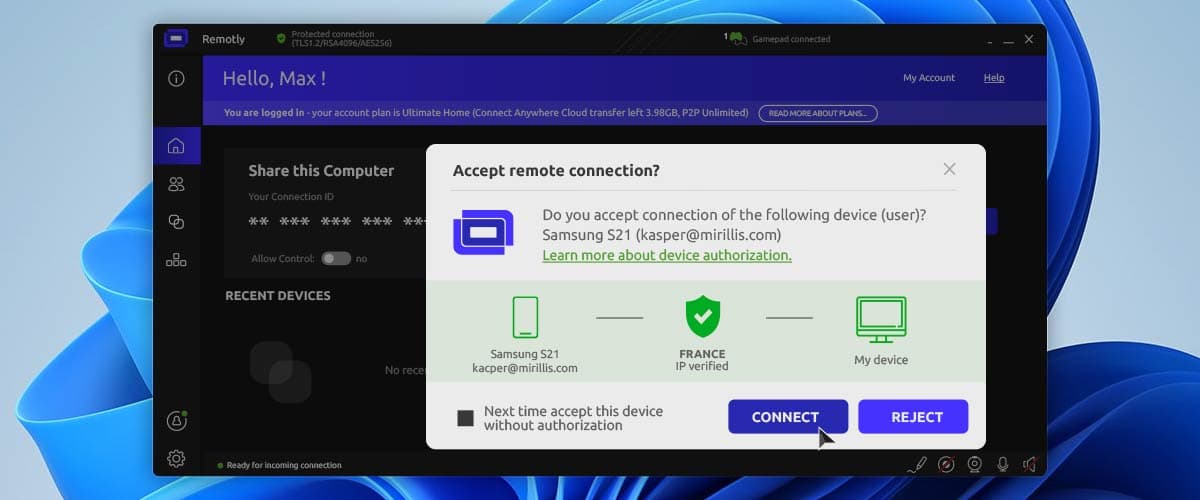
PH: Yes, absolutely. The main difference between our approach and that of the competition is our initial analysis of who is connecting to you. We use an advanced mechanism that performs IP scoring. When someone tries to connect, a window appears showing their country of origin, email address, IP score, and whether they’re using a VPN. This helps you quickly assess whether the connection is suspicious or potentially fraudulent. If there’s a risk, the system displays a red or orange alert.
Niebezpiecznik.pl: What if I’m an average user who just wants to use a VPN?
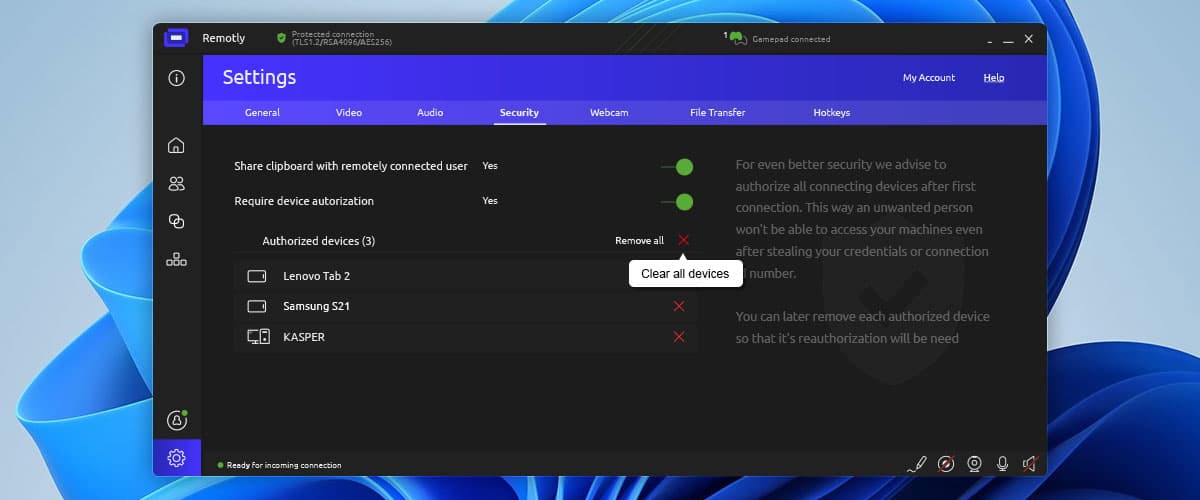
PH: You can absolutely connect using a VPN, especially if the person you’re connecting to already knows or trusts you. Your email address is also displayed in the connection pop-up, which helps identify you. It’s not easy for someone who is completely anonymous or random to connect through our system – we’ve done everything possible to prevent that. In addition to showing who is connecting to us and where they are connecting from, we can also authorize each device used to connect, which adds another strong layer of security. I personally trust this feature completely – I use it myself and was involved in its development. Moreover, our connection codes are very complicated with 3514 possible combinations, making them hard to guess. If a machine tried to generate codes automatically, our system would detect and block it. Even if I left the software running, no one could connect because a manual authorization of the connection is required every time. We’ve tackled the security bottlenecks and taken every precaution. I’m very security-conscious and constantly look for potential vulnerabilities that someone could exploit.
Niebezpiecznik.pl: Okay, so we’ve discussed the first element, which is protecting the user from themselves. The second element is company-level security. We briefly touched on this earlier when you mentioned dongle-based keys. On a scale from 1 to 10, how paranoid is your company about cybersecurity?
PH: Our level of paranoia when it comes to security is extremely high, and honestly, I hope it’s what helps us win the market. For example, we’re now developing a solution that’s practically finished and very exciting. It involves encrypting data with TPM 2.0 hardware modules. It’s an interesting solution. We have a public and private key and we don’t know the private key because it’s a hardware privilege. Since we don’t know it, no one else does either. In our solution, we’ll use the TPM to encrypt all connection traffic. Without physical access to the device that generated the key, the data is essentially uncrackable. I see this as the highest level of protection we can realistically implement; we can’t go any further. Moreover, we use RSA-4096 and AES-256 end-to-end encryption. We’re squeezing the maximum out of all available encryption standards. Honestly, I feel that our software will be unbreakable.
Niebezpiecznik.pl: I’m thinking about supply chain attacks. Are there risks in your area where someone could suddenly alter a library or sneak in a malicious component? How much of your software is built from scratch versus relying on third-party code?
PH: One of our biggest advantages is that we’ve built everything from the ground up over the last 15 years. I don’t have to worry about someone injecting malicious code or modifying a third-party library, because we don’t rely on them. That’s how it is, and maybe that’s why I spend so much time at work. I review everything ten times to ensure that no bugs slip through.
Niebezpiecznik.pl: We’ve discussed one problem – users being manipulated through social engineering – and another, which is software vendors introducing vulnerabilities that can be exploited internally. But what about the risk of a rogue employee?
PH: Anyone with access to critical information is always a potential point of failure. That’s why our security model is extensive. We have tiers of developers, each with access to increasingly sensitive components. When it comes to the most critical elements, access is limited to just three people.
Niebezpiecznik.pl: Imagine I come to you and say, “I run a company, and I need a remote access solution”. Could you please summarize the key security principles I should follow?
PH: First, good access hygiene. Second, validate who is connecting and whether they are trusted. I know it may be inconvenient to have to authorize your devices, but we implemented this so our customers can feel secure. Security and convenience don’t always go hand in hand. However, customers who have explored our robust security features admit they are impressive.
Niebezpiecznik.pl: I get the impression that security is more about habit than actual difficulty. For example, anyone who uses a password manager will tell you it’s the best way to manage passwords, but people need time to get used to it at first. One more thing: I’m an average person trying to help someone with a computer issue. Do you have any advice for people using your software for personal use?
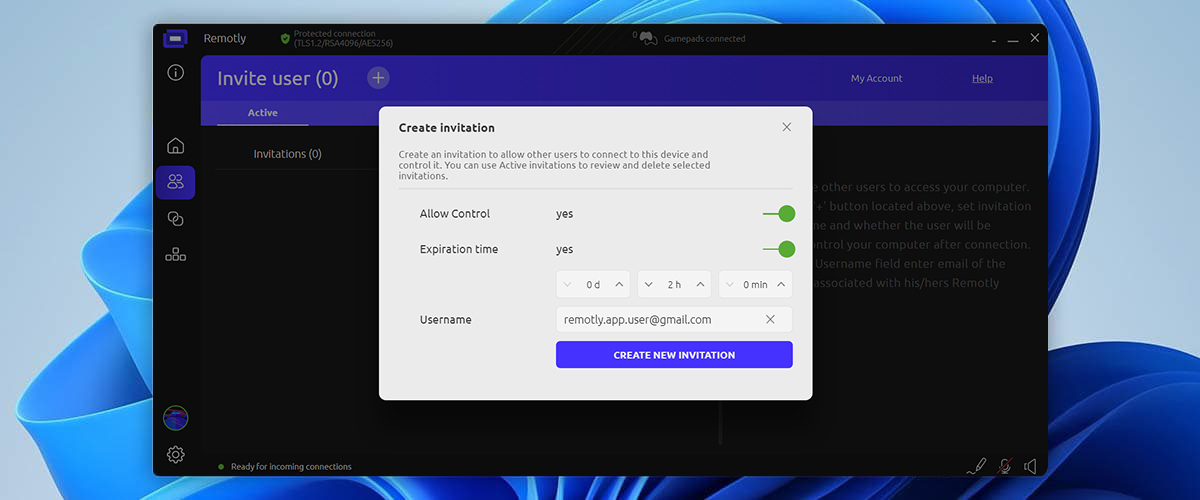
PH: The same solutions apply in both cases. I didn’t mention earlier, but we also have an invitation system. If you want to let someone in, you can send them an invitation, which creates a very secure connection. In addition, the authorization confirmation mechanism kicks in again. All of our security features are highly secure and available to both home and business users.
Niebezpiecznik.pl: Thank you very much for the conversation. Is there anything else you would like to add?
PH: I’d just like to remind all remote desktop users to be careful about who they allow access to their devices. One small mistake can lead to serious consequences.
Niebeziecznik.pl: Do it regardless of Paweł Hładkiewicz’s security paranoia and despite his watchful efforts to keep your connections safe. Thank you again for the conversation.
Author: Mirillis Team